
Quickstart Guide for Local Execution#
This guide helps you run Jupyter Book locally on Windows in a few simple steps.
1. Install Anaconda#
Download and install Anaconda.
During installation, select the option to add Anaconda to the system PATH.
2. Download the Repository#
Go to: fum-cs/jupyter-book-tutorial
Or download directly: Download ZIP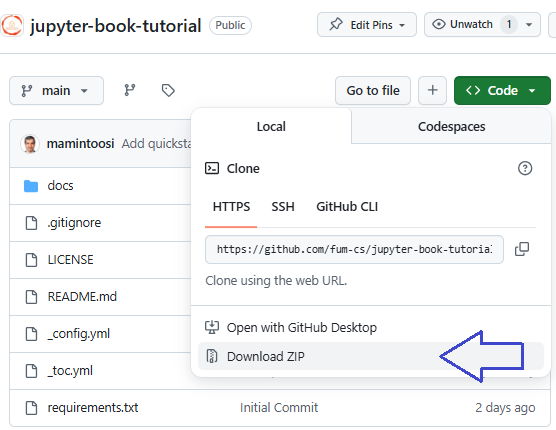
Extract the ZIP file to a folder.
3. Install Jupyter Book#
In the Anaconda Command Prompt, run:
pip install -U jupyter-book
4. Build the Book#
Go to the folder where you extracted the files:
cd path\to\jupyter-book-tutorial
Build the book:
jupyter-book build ./
Open the generated file
_build/html/index.htmlin your browser to view the book.